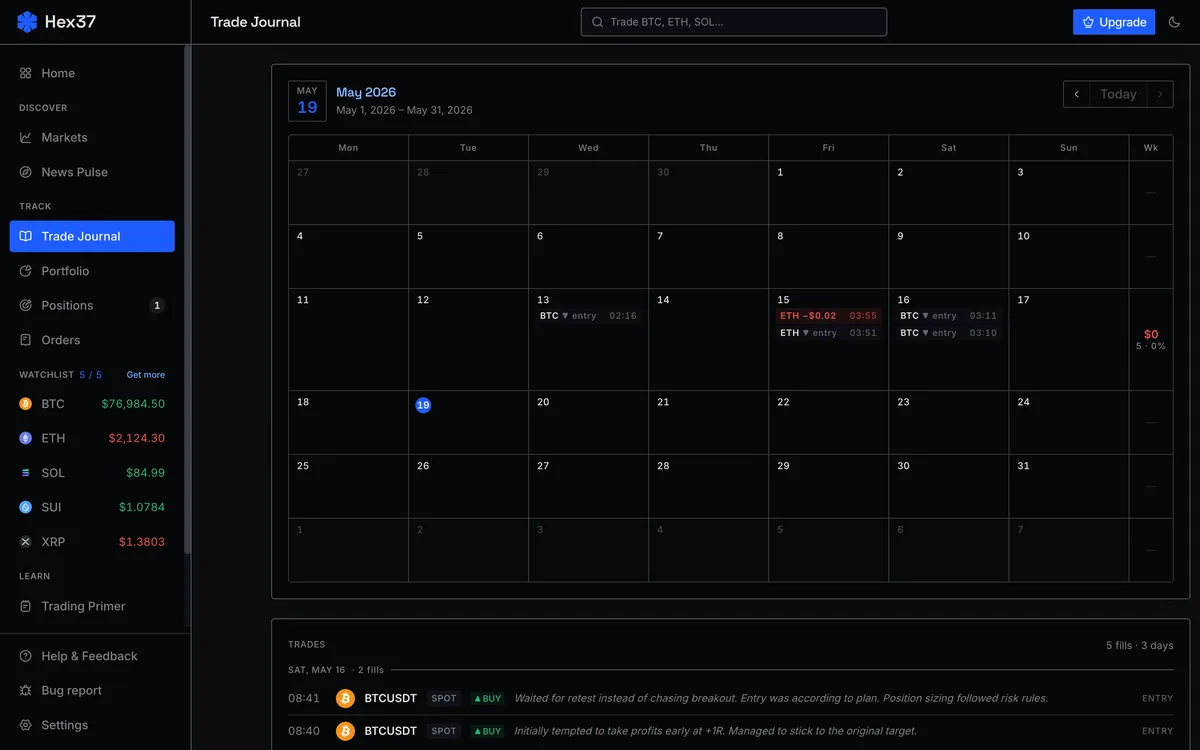
The trade journal, and what its breakdowns reveal
The journal is at /app/journal. Every trade you take is logged automatically with full context: entry, exit, R-multiple, fees, fill type, regime tags. The page also computes breakdowns by asset, day-of-week, hour, and session.
A real trade journal is the feedback loop that turns experience into skill. Without one, you make the same mistakes for years. With one, the patterns show up in the data within weeks.
What the journal captures automatically
- Date, time, asset, direction
- Entry price, stop price (defines R), exit price
- Position size, risk in dollars, risk as percent of account
- Fees paid, maker vs taker, slippage
- R-multiple at exit (the dollar PnL, normalized to risk)
- Tags for regime, asset class, and any behavioral notes you add
The R-multiple is the single most important number in the journal. It normalizes outcomes so different trades become directly comparable. A 200-pip win on one pair and a 5% gain on another are both "+2R" if you risked 1R on each. R-multiples make apples-to-apples possible.
What you should add yourself
Per-trade notes are the highest-value field. Write one or two sentences:
- What was the setup (specifically, not just "looked good")?
- Did you follow the plan, or improvise?
- Any behavioral observation? (FOMO, hesitation, revenge?)
The behavioral observations are gold. The data alone cannot tell you why you took a trade. Your honest notes can. Six months in, re-reading them will reveal patterns you would never have noticed otherwise.
The breakdowns
The journal computes performance breakdowns automatically:
By instrument
Average R, win rate, total PnL per asset. Most traders find they make money on one or two pairs and lose on the rest. The fix is obvious once you see the data: stop trading the losing pairs.
By day of the week
Some traders consistently lose on specific days (often Mondays or Fridays). The data shows it; intuition usually misses it.
By hour
Time-of-day patterns are real and individual. You might trade beautifully in the morning and badly in the afternoon. Or vice versa. Restricting your trading to your profitable hours is one of the highest-ROI changes anyone can make.
By session
Asia, Europe, US, and overlap windows. Crypto has session rhythms even though it never closes. Some traders' edges show up only in specific sessions. The breakdown surfaces this.
The weekly review
Once a week, spend 20 to 30 minutes in the journal:
- Glance at your R distribution. Are losers clustered at the planned -1R, or are they leaking past?
- Count plan-adherent vs improvised trades. Improvised trades usually have worse R-multiples. The data tells you whether you have a discipline problem.
- Check breakdowns for surprises. Any pair, day, hour, or session with consistently bad numbers?
- Read your behavioral notes. Any pattern? FOMO clustering on certain types of moves? Revenge trading after specific kinds of losses?
Write down one specific thing you will adjust next week. Just one. Small consistent changes compound into a different trader within months.
Trades not taken
The journal also lets you note trades you considered but skipped. Use it. Tracking your no-takes lets you analyze:
- Are you systematically passing on winners (timid)?
- Are you correctly avoiding losers (selective)?
This is harder to keep up with than logging trades you actually took. Even a partial habit (just tag your watchlist items you watched but skipped) generates useful data over time.